
Overview
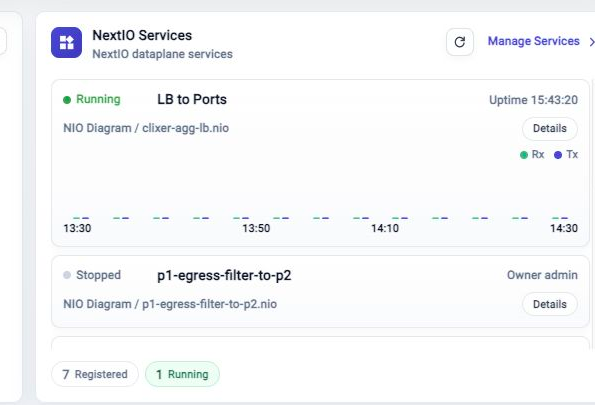
The Dashboard NextIO Services card gives a compact service summary. Use it to confirm whether services are registered, running, stopped, and producing traffic.
Read The Card
Each service row can show state, name, uptime, owner, design file, and a small traffic preview. The footer summarizes registered and running service counts.
Click Details when one service needs inspection. Click Manage Services to open the full NextIO service management page.
When To Drill Down
Open the full NextIO Services page when you need to start, stop, inspect, or manage services. Use Metric Browser when the traffic preview raises a metrics question.
Troubleshooting
Service Count Looks Unexpected
Open Manage Services and compare the full service table with the Dashboard summary.
Traffic Preview Is Empty
Confirm the service is running and that traffic samples are available. Some services can be running without current traffic.
Related Tasks
- Use NextIO Services for service runtime management.
- Use Metric Browser for detailed traffic metrics.
- Use FlowDirector Dashboard for the full Dashboard operating view.