
Aggregate
Bring multiple feeds together
Combine ingress sources into one stream for shared filtering, processing, capture, or tool delivery. Place common downstream functions after the aggregation point.
Aggregation workflowNPB / Network Packet Brokering
Bring monitoring feeds together, select relevant traffic, and distribute it across security, monitoring, and capture systems. 01Layer connects aggregation, filtering, replication, and load balancing in one service design and operating environment.
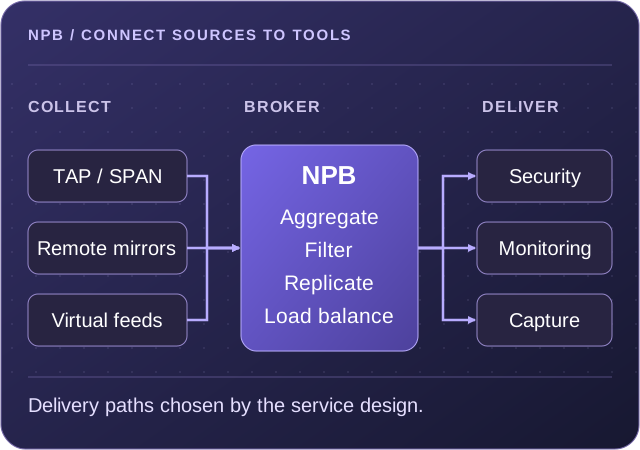
Consolidate traffic from multiple inputs into the service paths that need it.
Select relevant traffic and define what each destination receives.
Distribute streams across output groups and add parallel tool or capture branches.
Traffic selection and distribution
NPB functions determine which sources feed a service, what traffic continues, and how it reaches the destinations. Connect the required components in NextIO, then configure the rules and output relationships.
Aggregate
Combine ingress sources into one stream for shared filtering, processing, capture, or tool delivery. Place common downstream functions after the aggregation point.
Aggregation workflowFilter
Match traffic using the fields supported by the target platform and associate rules with forwarding or drop actions. Apply selection before shared processing or at an output.
Filter component referenceReplicate
Create multiple copies of a stream so separate monitoring, security, or capture paths can receive the same source traffic. Define the required branches and replication settings.
Replication workflowLoad balance
Distribute traffic across multiple outputs using the selected symmetric hash method. Configure the participating ports and check the receiving capacity of each tool.
Load Balancer referenceMirror
The FlowDirector SPAN component copies selected ingress or egress traffic to a destination. Its settings include optional ERSPAN transport, VLAN handling, and truncation.
SPAN component referenceMap
FlowMagic Multiplexer and Traffic Matrix components define input-to-output relationships. Configure mappings and, where used, the associated active and standby HA settings.
Traffic Matrix referenceNeed traffic preparation as well? Add Advanced NPB functions for deduplication, burst shaping, detunneling, or client-address restoration before downstream delivery.
Copies and shared capacity
Replication and load balancing serve different delivery needs. Use the appropriate pattern for independent tools, a group of equivalent receivers, or both.
Send the same selected stream to multiple destinations. For example, a security inspection path and a capture path can each receive the traffic they need from one replication point.
Distribute a stream across receivers that share the monitoring workload. The selected symmetric hash method provides flow-affine selection so both directions of a flow remain together.
Combine both with FlowDirector LB Groups. Replicate traffic to multiple groups, then load balance within each group. This supports separate tool groups that each need visibility of the selected stream.
A visible service definition
The Diagram Editor keeps the traffic path and component settings together in a saved .nio design. The documented example connects an input-port group to a load balancer and multiple output paths.
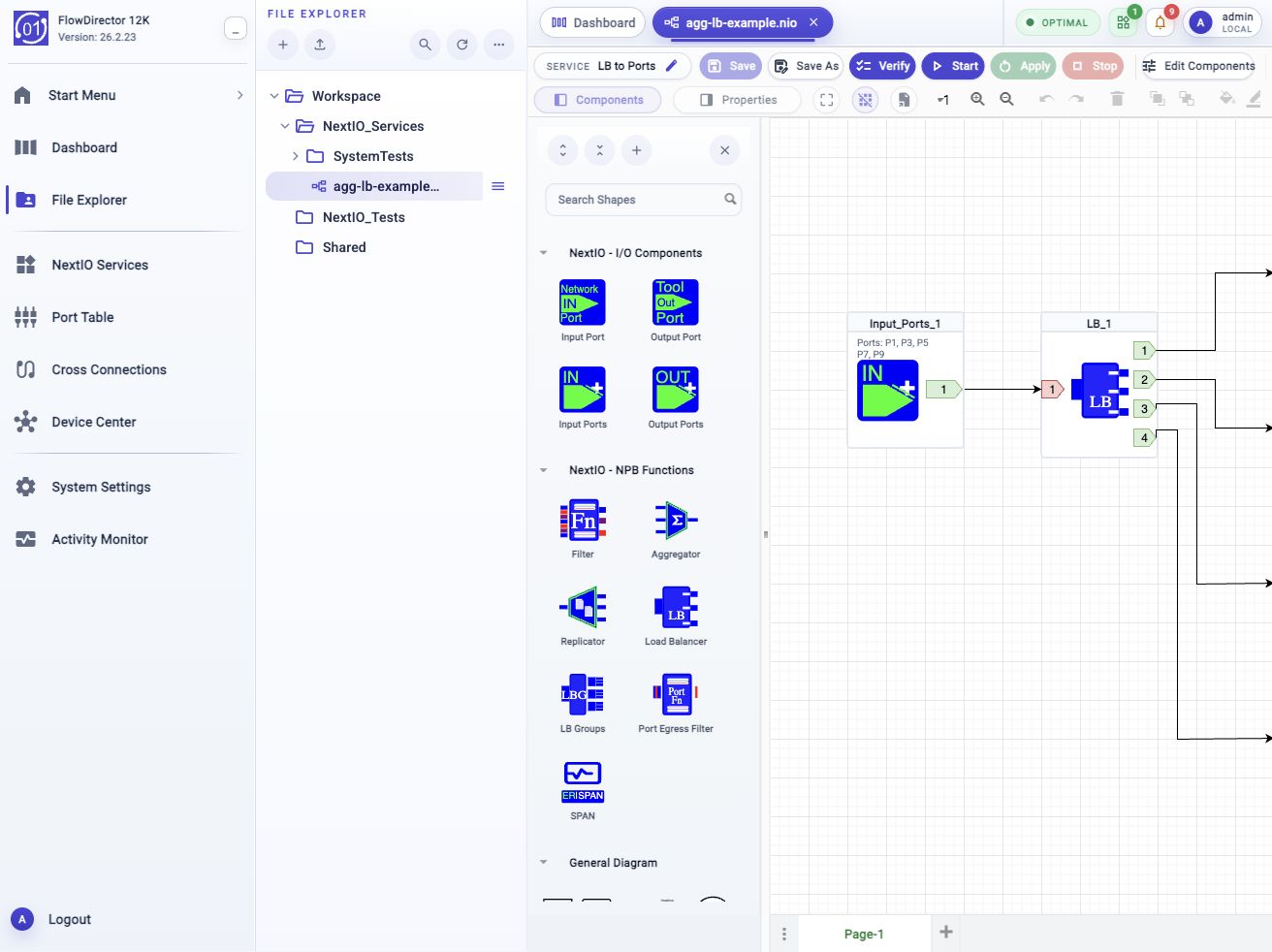
agg-lb-example.nio design from the editor guide. View full-size screenshot.Choose the input and output components for the product family, then connect the ports, groups, or service endpoints.
Add filter rules, replication branches, load-balancing methods, or matrix mappings. Changing component output counts can change the available connectors.
Save and Verify after editing properties or wiring. Use Start for a stopped service or Apply to update a running service with the saved design.
Confirm traffic selection, flow distribution, and volume at the destinations before expanding the service.
Match the delivery and processing needs
NPB describes the traffic-handling functions. Choose a deployment for the port capacity, processing, and downstream services you need. Each product can stand on its own; combine platforms when the requirements call for it.
Use the dedicated lossless fabric for traffic delivery, with documented filtering, aggregation, replication, load balancing, LB Groups, egress filtering, and SPAN functions.
Explore FlowDirectorAdd software-defined traffic services and scale processing separately from the fabric. Select the Service Node model and functions for the intended delivery and preparation workload.
Explore Service NodeCombine NPB functions with capture, metadata, and analysis services. The FlowMagic palette includes Multiplexer, Traffic Matrix, Filter, Aggregator, Replicator, and Load Balancer.
Explore FlowMagicThe component palette, settings, and capacity depend on the product and release. The FlowDirector and FlowMagic references document the family-specific controls.
Keep the delivery path accountable
NextIO Services connects the saved design with runtime state, traffic, counters, logs, and workflow-backed actions. Use these views to confirm the intended service behavior and investigate exceptions.
| Area | Operating check |
|---|---|
| Selection rules | Review the configured rule actions and available counters. FlowDirector Filter starts with Pass All; Port Egress Filter starts with Drop All, so configure each for its intended purpose. |
| Output relationships | Confirm replication branches, load-balancing members, and matrix mappings match the receivers that should see the traffic. |
| Traffic and capacity | Review ingress and egress throughput, errors, and drops over the relevant time window; confirm the assigned load at the receiving tools. |
| Changes and failures | Save and Verify before runtime changes. Saving alone does not update a running service. Inspect Activity Monitor workflow traces if Start or Apply fails. |
Technical references
Work with our team to map your observation points, tool groups, and traffic volumes to the right delivery architecture.