
Deduplication
Keep overlapping feeds from multiplying the work
Identify repeated observations using a configured fingerprint and time window. Forward the unique stream and inspect duplicate classifications when needed.
Explore duplicate handlingAdvanced NPB / Traffic preparation
Remove repeated observations, smooth bursts, expose inner traffic, and restore client-address context. Advanced NPB prepares the traffic your monitoring, security, and capture systems receive—with configurable services operated through 01Layer.
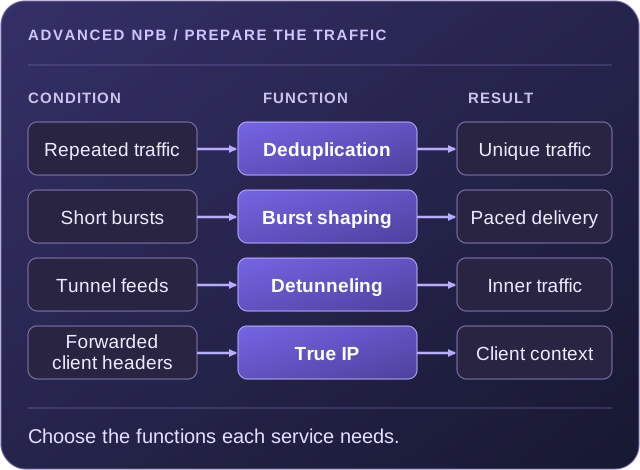
Remove duplicate observations before they consume tool bandwidth, storage, or analysis resources.
Shape burst delivery and remove encapsulation where downstream tools need the inner traffic.
Use available forwarded-client headers to restore source-address context for analysis.
Choose the preparation the traffic needs
NPB selects and distributes traffic. Advanced NPB adds processing that prepares it for the next stage. Use a single function or combine the required stages in a NextIO service; the traffic and receiving tools determine the design.
Deduplication
Identify repeated observations using a configured fingerprint and time window. Forward the unique stream and inspect duplicate classifications when needed.
Explore duplicate handlingMicroburst Shaper
Buffer and pace traffic using configured bit-rate and packet-rate limits. Match the service settings to the burst profile and the receiving system.
Explore burst controlsDetunnel
Remove configured tunnel headers so downstream filtering, capture, or analysis can work with the inner traffic. Use staged processing where multiple layers need removal.
Explore tunnel handlingTrue IP
Use configured HTTP ports and forwarded-client header names to recover source-address context carried through a proxy or translated path.
Explore True IPOverlapping observation points
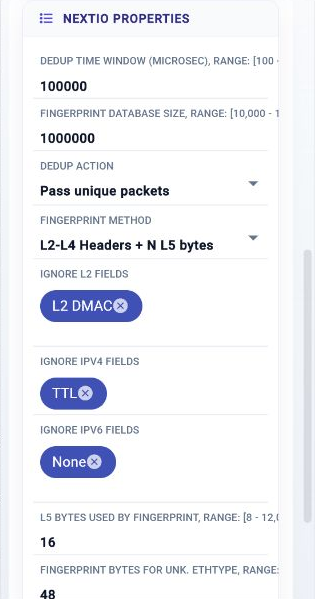
The same traffic can arrive through multiple TAP, SPAN, ERSPAN, or mirrored feeds. Deduplication compares configured fingerprints within a bounded time window, so repeated observations can be removed before replication, capture, or tool delivery.
Receiver-aware delivery
Short bursts can place different demands on a receiver than the average traffic rate suggests. The Microburst Shaper smooths traffic using a configured buffer and maximum egress rates.
Size the buffer and egress limits together, then validate them with representative bursts. Sustained offered traffic still needs to fit the available downstream capacity.
Microburst Shaper reference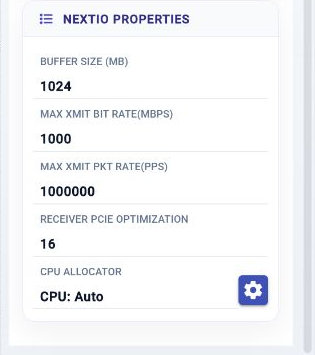
Encapsulation and client identity
Tunnel transport and proxy paths can change what a monitoring tool sees. Configure the relevant preparation function for the source environment and the form of traffic required downstream.
Remove encapsulation before tools inspect, filter, or capture the original traffic. The Detunnel component exposes operation selection, VxLAN and GTP port settings, configurable header removal, and ERSPAN-related settings.
Restore source-address context from client information retained in configured HTTP headers. The reference exposes HTTP ports and header names such as X-Forwarded-For, True-Client-IP, and NS-Client-IP.
Related 01Layer workflows include content-based selection and additional header stripping or truncation. Choose these stages according to what the receiving tool or capture workflow needs.
Preparation as a service
NextIO lets you connect preparation functions with NPB selection and delivery, capture, metadata, and analysis. The order and branches should reflect the source traffic and what each destination needs.
Save the design, run Verify, then use Start or Apply as appropriate. Review service traffic, logs, counters, and workflow output after the change.
Explore NextIO service designConfirm where overlapping observations, bursts, encapsulation, or proxy headers enter the service.
Use only the functions needed for the destination. Decide whether raw, intermediate, unique, or duplicate traffic needs a separate branch.
Set fingerprint fields and windows, buffer and rate limits, tunnel operations, or HTTP header names for the actual traffic profile.
Replay or generate representative traffic, inspect the results, and check component errors and receiving-tool behavior before increasing load.
| Operational need | Service approach |
|---|---|
| Overlapping mirrored feeds | Converge the observation feeds into Deduplication, then send the unique stream to capture or NPB distribution. Use the duplicate branch during classification checks. |
| Remote encapsulated traffic | Apply the required detunneling stages, then filter or capture the exposed traffic. Retain an intermediate branch if another tool requires that view. |
| A burst-sensitive receiver | Place Microburst Shaper on the selected delivery path and configure its buffer and egress limits for the destination. |
| Proxy-facing analysis | Configure True IP for the available forwarded-client headers, then inspect the restored address context in the downstream analysis path. |
Scale the processing you need
Advanced NPB is a capability group, not a requirement to deploy a separate appliance. Use supported processing within a FlowMagic service, or use a Service Node when the architecture calls for processing capacity that scales separately from the traffic fabric.
The FlowMagic NextIO reference documents Deduplication, Microburst Shaper, Detunnel, and True IP. Combine the required functions with NPB, capture, metadata, or analysis in the supported service environment.
Explore FlowMagicService Nodes provide software-defined services that can extend the FlowDirector fabric. The FSN-400 specification includes deduplication, tunnel processing, header transformation, and microburst control; select the model and configuration for your workload.
Review FSN-400 capabilitiesAvailable functions and operating capacity depend on the platform and release. Match processing resources to the traffic mix and the functions enabled together.
Technical references
Work with our team to map your traffic conditions, tool requirements, and processing capacity to an Advanced NPB service.