
01 / Traffic generation
Exercise capacity under load
STL PktGen generates stateless traffic from configured streams. Define the load profile, duration, frame-size distribution, payload, and modifiers for a controlled test.
STL PktGen referenceValidation / FlowMagic on 01Layer
Test capacity, application behavior, and resilience before rollout. FlowMagic brings traffic generation, application simulation, replay, and network emulation into 01Layer—connecting controlled workloads with measurable outcomes.
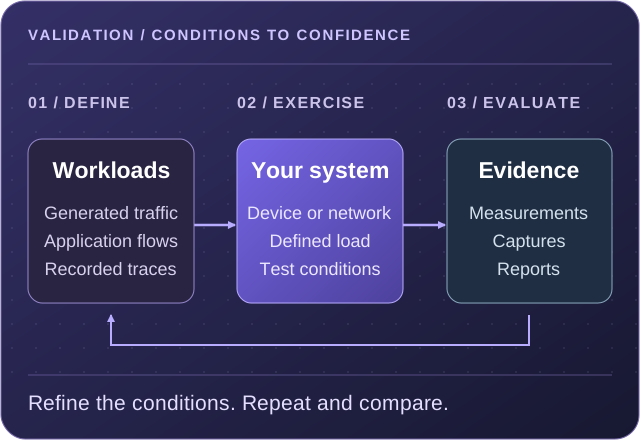
Exercise devices and service paths with defined traffic mixes, rates, and durations.
Evaluate behavior when delay, loss, reordering, or bandwidth constraints change.
Bring test conditions, measurements, captures, and validation output into the review.
Choose the right test
Use the NextIO testing components to generate traffic, simulate client and server behavior, measure performance, or reproduce a recorded condition. Select the method that matches the question you need to answer.
01 / Traffic generation
STL PktGen generates stateless traffic from configured streams. Define the load profile, duration, frame-size distribution, payload, and modifiers for a controlled test.
STL PktGen reference02 / Application simulation
AppSim Center builds stateful application simulations. Configure client and server ports, networks, application templates, and a duration and load profile.
AppSim Center reference03 / Performance testing
Use the RFC-2544 component to configure a port pair, traffic direction, load-search bounds, frame lengths, iteration duration, and an acceptable loss threshold.
RFC-2544 reference04 / Integrity testing
The Bit Error Rate component measures errors across a generated test stream. Select the traffic port, BER mode, test profile, and topology for the intended path.
Bit Error Rate reference05 / Recorded traffic
Replay PCAP traffic with selected ports, modifiers, duration, and replay controls. The component supports an optional second port and ordering relative to Port A.
Replay reference06 / Network emulation
Use the WAN Emulator to apply configured loss, delay and jitter, reordering, duplication, bit errors, or bandwidth limits in the service path.
WAN Emulator referenceThese tools are documented in the FlowMagic NextIO component reference. Available components, settings, and operating capacity depend on the deployment platform and release.
Make the workload representative
A useful test starts with the traffic and interactions your network must handle. 01Layer supports packet-database templates, application templates, captured traces, and extracted session data as inputs to generation and validation workflows.
For stateless generation, choose original, fixed, listed, or IMix frame lengths. Configure payload fill, field modifiers, destination MAC discovery, and the duration and load profile.
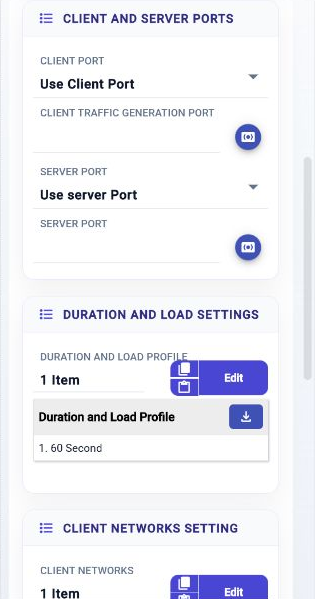
AppSim exposes client and server port selection, network settings, and application templates. Define these alongside the offered load so the test reflects the intended application exchange.
Select a PCAP for replay, choose the traffic ports, and configure selectors, modifiers, and replay controls. Keep the source trace and test settings together when comparing a change with its baseline.
See how NextIO services are built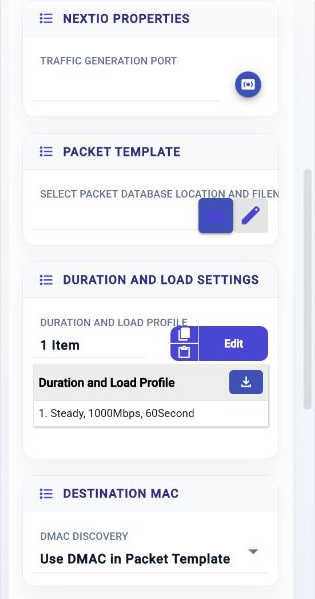
Capacity and resilience
Evaluate a baseline under controlled load, then change the conditions that matter to the deployment. The testing components expose the parameters needed to define and repeat the exercise.
RFC-2544 performance testing
Configure both sides of the test and how the load search progresses. Keep these settings with the result so comparisons use the same assumptions.
WAN emulation and integrity
Place the WAN Emulator in the service path and enable the required impairment controls. Define the rate, delay, queue, or error settings for the condition being evaluated.
Control base and maximum delay, jitter range, reorder queue depth and burst size, duplication rate and copy count, or bandwidth rate and bucket size. Bit-error insertion also provides controls for the eligible region of the traffic.
Review WAN Emulator settingsThe Bit Error Rate component generates a test stream and measures bit errors. Configure its BER mode and profile, traffic port, and frame-mode topology; VLAN, addressing, and container-frame settings support the configured path.
Review BER settingsFrom test design to decision
NextIO supplies the design and service controls; 01Layer supplies traffic inspection, workflow history, capture, and analysis. FlowMagic validation workflows also provide test reporting and validation output.
Use the evidence to compare expected behavior with observed behavior, and retain the context needed to repeat the test.
Choose the device or service path, workload, duration, and acceptance criteria. Record the baseline configuration before changing it.
Configure the NextIO test components, endpoints, rates, and duration. Save and Verify the design, then Start the service or Apply the saved changes to a running service.
Review service traffic, counters, logs, and workflow output. Add capture or QoS analysis where the question requires traffic treatment or timing evidence.
Review results against the chosen criteria. Keep the workload definition, test configuration, relevant captures, and reports with the deployment decision.
| Review area | Available context |
|---|---|
| Service behavior | NextIO Services provides state, ingress and egress throughput, errors, drops, and counted rules, with relative or custom time windows. |
| Run history | Activity Monitor shows workflow state, progress, operator identity, and runtime, with original configuration and trace output when stored. |
| Traffic treatment | Capture and QoS analysis workflows connect generated, replayed, or captured traffic with counters, timing, and analysis. |
| Review material | Test reports and validation output, supported by the source traffic, service design, and relevant captured evidence. |
Put validation to work
Exercise forwarding, application handling, and stream integrity before deployment. Compare software or configuration revisions under defined workloads.
Evaluate capacity and QoS treatment across the intended service path. Introduce bandwidth constraints or adverse WAN conditions to assess the deployment assumptions.
Use captured traces and replay controls to revisit an observed condition. Repeat the workload after a change and inspect the resulting behavior.
Tools and technical references
Read the component settings and operating guides, or explore the testing solution briefs already available on the site.
Work with our team to map your devices, workloads, performance targets, and test conditions to a validation plan.