
Skip to content
OBSERVE. ANALYZE. ACT.
Support Login

SNMP / Polling and event notification

Bring appliance health into your monitoring workflow.

Let your monitoring system poll the appliance and receive supported event notifications. 01Layer provides a shared workflow for SNMP versions, access settings, primary and second trap receivers, and delivery testing.

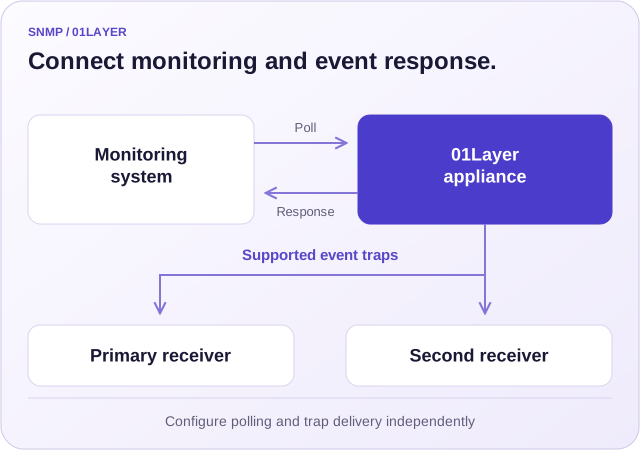
An external monitoring system polls the 01Layer appliance, while supported appliance events are sent as traps to one or two enabled receivers.
View the workflow at full size

Connect existing monitoring

Configure SNMP access for the monitoring system already in use.

Send supported events

Deliver traps to primary and optional second receivers.

Verify the connection

Send a named test trap and inspect the workflow result.

Two complementary paths

Poll for state. Receive event notifications.

Polling and trap delivery have separate settings. Configure each path for the monitoring task it needs to perform.

SNMP polling access

An external monitoring system queries the appliance through the configured SNMP service port. Choose the version and matching read-only community or SNMPv3 security settings.

The SNMP and Trap Service view also provides access to Infinicore MIB information for monitoring integration.

Polling configuration

Outbound event traps

When an appliance event carries an SNMP trap notification, it is sent to each enabled trap target. Define the destination address, port, version, and credentials for each receiver.

The second receiver can receive the same events as the primary receiver. Each target has its own settings.

Trap configuration

Monitoring access

Match the service to your monitoring system.

Review the current settings before applying changes. The Web UI and 01sh CLI expose the same SNMP configuration.

Polling configuration choices
SettingWhat it controlsWhat to verify
Service enablement and portWhether the polling service is exposed, and the port it listens on. The standard polling port is 161.Disabling polling retains its saved settings. Check the configured port and network access from the monitoring host.
SNMPv1 / SNMPv2cPolling with a read-only community string.Use the version and community expected by the monitoring system. The CLI value v2 is shown as V2c in the UI.
SNMPv3 identityUSM security username and security level.Match the security name and the selected no-auth/no-privacy, authentication-only, or authentication-plus-privacy mode.
SNMPv3 authentication and privacyAuthentication and privacy protocols and keys when selected.Match the corresponding settings at the monitoring system; the manual lists the supported protocol choices.
MIB informationObject definitions for the appliance integration.Review the Infinicore MIB files available from SNMP and Trap Service.

Event delivery

Reach the receivers responsible for response.

Primary and second trap destinations are enabled independently. The same supported event can reach both teams without making one receiver responsible for forwarding to the other.

Primary target

Define the event destination

Set receiver address, port, version, and community or SNMPv3 credentials. The standard trap port is 162.

Trap service reference

Second target

Deliver the same events twice

Enable the second trap server and configure its own destination and security settings. Both enabled receivers receive the supported traps.

Second receiver setup

Test delivery

Check the actual receiver

Use Send Trap for Test Purpose with a recognizable message. Confirm receipt and inspect the workflow log for server, port, version, and message.

Test trap procedure

The test switch and message are one-time workflow inputs. They do not remain enabled as persistent SNMP settings.

One operating workflow

Configure, apply, and confirm.

Open System Settings > SNMP and Trap Service. The same configuration is also accessible through the CLI.

  1. Review the current state

    Inspect the MIB information, polling enablement, version, port, and existing receivers. Record the current values for the planned change.

  2. Configure the two paths

    Set polling credentials and separately configure each enabled trap destination. Match network routing and access rules to the monitoring hosts.

  3. Apply with a delivery test

    When testing is needed, enter a clear test message. The workflow validates enabled trap targets and sends the test before committing trap delivery settings.

  4. Confirm outside the appliance

    Verify polling from the monitoring system and test-trap receipt at each receiver. Review the applied settings and workflow output in 01Layer.

Inspect the configured state in 01sh

show system snmp

Focused checks

Resolve the connection at the right stage.

Use the symptom to select the next check, then compare the result at both ends.

SNMP integration checks
SymptomInspect firstThen confirm
No polling responseService enablement, address, port, route, and access rules.Version and community or SNMPv3 username, security level, protocols, and keys.
No test trap receivedThe target is enabled and its address, port, and version are correct.Receiver credentials, network reachability, and the workflow delivery record.
Only one receiver gets eventsThe second receiver has been explicitly enabled and configured.The second receiver’s own network path and security settings.
Test works but an expected event is absentWhether that event includes an SNMP trap notification.The corresponding appliance event and time window in Activity Monitor.

Keep exploring

From overview to operation.

Open the function descriptions, component controls, and related workflows behind this capability.

Connect 01Layer to your monitoring operation.

Discuss the sources, service requirements, and deployment that fit your operation.

Talk to our team