
Managed capture
Retain a continuing history
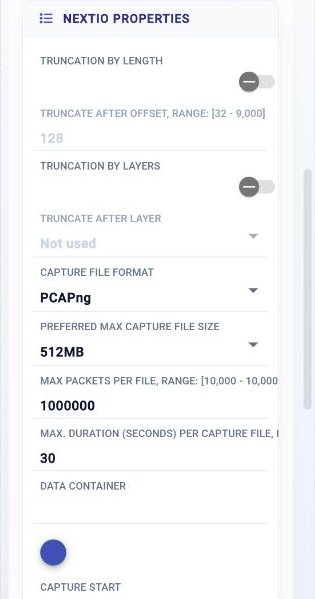
Packet Capture writes to the managed storage subsystem through a selected data container. Configure capture format, file limits, start conditions, and runtime resources.
Packet Capture controlsPackets / Capture and evidence
Preserve live traffic, bring in field captures, and return to the evidence when an issue needs a closer look. 01Layer connects capture storage, targeted inspection, metadata analysis, and trace export in a shared workflow.
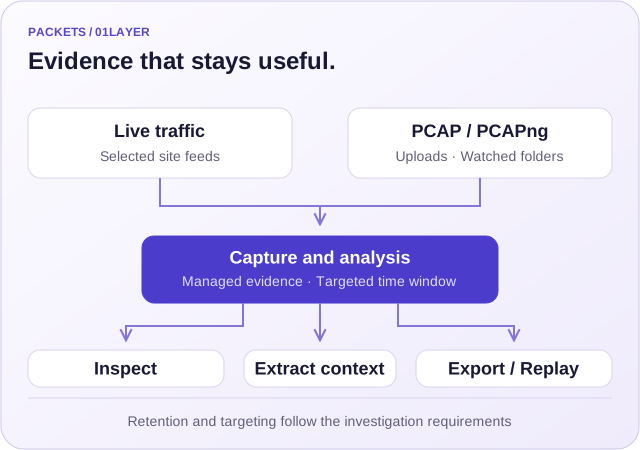
Choose the traffic, storage destination, and capture policy.
Narrow evidence by time, address, protocol, and content.
Export selected traffic or carry it into analysis and replay.
Capture choices
FlowMagic Capture Services provides managed capture, direct PCAP writing, and metadata extraction as distinct NextIO components.
Managed capture
Packet Capture writes to the managed storage subsystem through a selected data container. Configure capture format, file limits, start conditions, and runtime resources.
Packet Capture controlsPCAP writing
Packet Writer writes received traffic to a PCAP location with a file prefix and size limit. Optional timestamp reordering uses a configured window and queue capacity.
Packet Writer controlsPost-capture context
Metadata extracts and reports information from captured traffic. Select address, protocol, port, VLAN, and DNS indexes that support the investigation.
Metadata capabilityManaged retention
Capture Service supports local disks, NVMe, RAID, NAS over NFS, iSCSI block storage, and RAM-backed targets. Data containers organize the selected storage with quota and rotation behavior.
Truncation removes evidence beyond the selected boundary. Size retention and capture content around the investigation and replay requirements.
Focused inspection
Use the timeline to isolate an event, inspect the selected traffic, and export a trace that another team can reproduce.
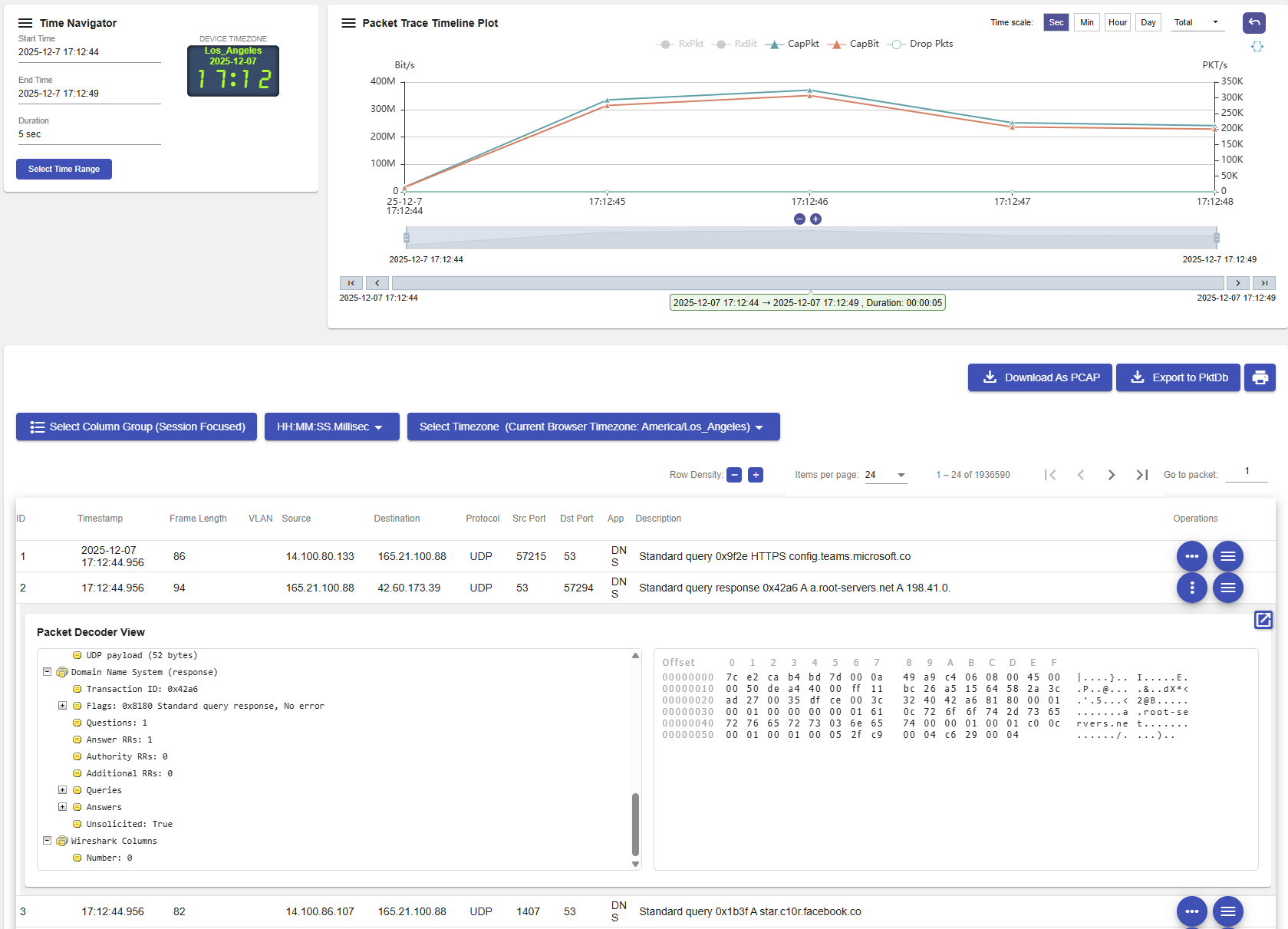
Target a time window, IP address, IP list or range, BPF expression, or regular expression in the supported capture and analysis workflows. Review the protocol fields and chronology needed to explain the event.
Export the selected evidence as PCAP for external analysis or lab reproduction. Keep the selected source and time window with the findings so another operator can follow the same investigation.
Live evidence and field captures
The Joint Realtime and PCAP Analysis workflow accepts remote PCAP and PCAPng uploads, monitored folders, multi-file batches, and continuing live capture.
| Source | Workflow | Investigation value |
|---|---|---|
| Live capture | Collect selected site traffic continuously. | Review current conditions while retaining evidence for later questions. |
| PCAP / PCAPng upload | Upload a remote or manually collected trace. | Bring a field observation into the same analysis environment. |
| Monitored folder | Process files arriving in a watched collection location. | Use a repeatable intake path for ongoing evidence submissions. |
| Multiple capture files | Select timestamp merge when chronology across sources matters. | Review a time-ordered traffic set for investigation, profiling, or replay. |
From capture to action
Plan storage and analysis together so the needed evidence is still available when an incident is reviewed.
Connect live traffic through the required filtering or processing path, or choose an uploaded capture set.
Choose the data container, quota, format, file boundaries, and any truncation. Align metadata and raw capture retention windows.
Select the event window and targeting criteria. Inspect protocol context, timelines, and the relevant traffic rows.
Export a scoped trace, document the analysis in a notebook, or use replay to reproduce the condition in a validation environment.
Keep exploring
Open the function descriptions, component controls, and related workflows behind this capability.
Discuss the sources, service requirements, and deployment that fit your operation.